Legacy
Bubble.io Dev Team Conventions Part 1: Building the User Interface

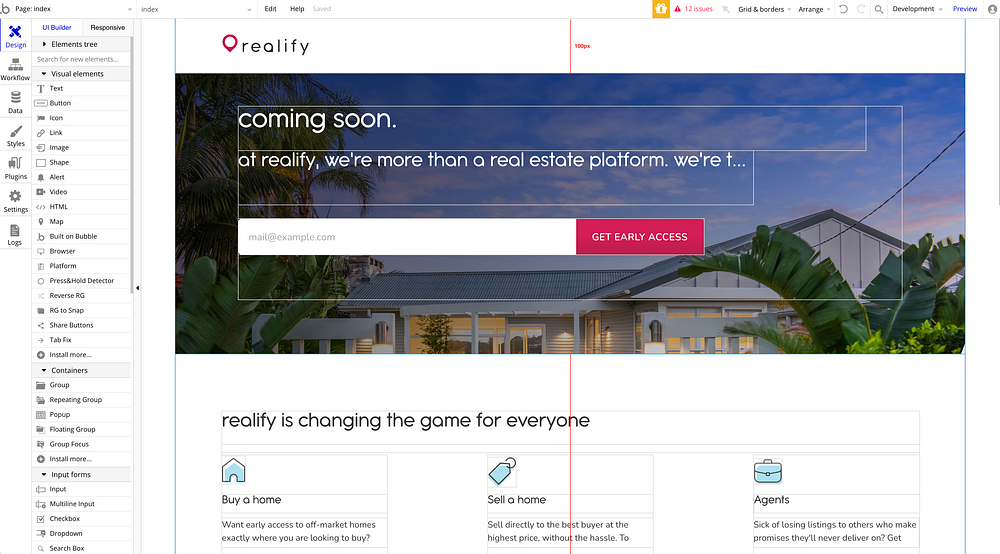
Early Access Landing Page for our startup Realify.
Introduction
I lead a team of Bubble.io Developers using Bubble to build beautiful web applications to a professional standard. It is a great joy when I open one of their projects and I can easily navigate my way around their file to the point it feels that I actually developed it. It’s the little things, right?
Here are some of the principles I ask my developers to follow to ensure that everyone can understand each other’s work.
I wrote this for my own developers to read. But I thought you may also find it helpful.
We transcribe manually from Figma into Bubble.io
We typically transcribe the work our UIUX designers have done in Figma into Bubble.io manually, as the way that layers are set up don’t translate the way we want them into Bubble for grouping and responsiveness.
Try to keep the editor looking like the finished product
Try to make elements appear in the Editor as they do on the Page. This makes finding your way around easier for everyone. It is much less intimidating for a new developer to understand.
For example, try to make text boxes tall enough that all lines are visible and not showing the “…” at the end. (This can be more difficult with dynamic expressions).
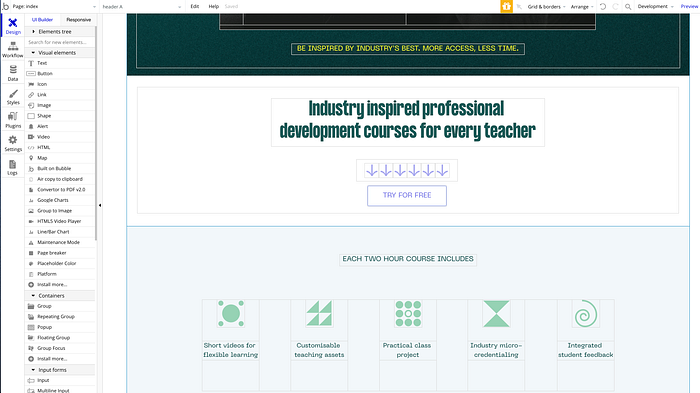
Client project Creatable’s landing page in the Bubble.io Editor.
Set “Show element on page load” to True for the elements that appear when the page loads (rather than do tricky on / offs with conditionals).
Keep this all as simple as possible.
Keep spacing consistent
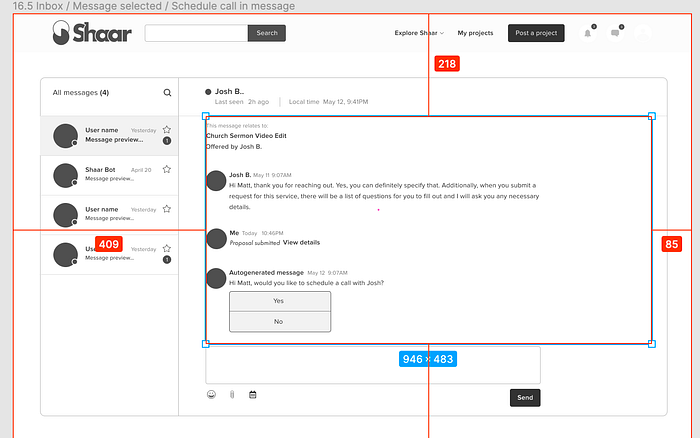
Mid-Fidelity Wireframes for Client Project Shaar messaging feature.
Spacing is an important part of any UI design system. We follow the spacings of the designers exactly.
Often Figma text objects have no padding around the actual text, but in Bubble.io the text objects need to be bigger than in Figma or the text disappears in the editor.
Hierarchy
Always think about the elements in a logical hierarchy.
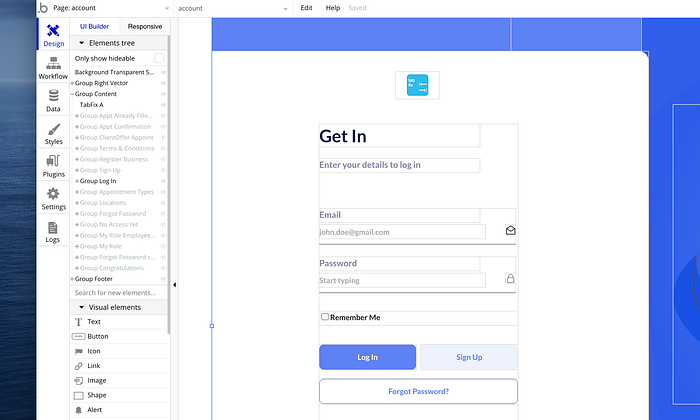
Hierarchy displayed for Single Page App with multiple layers for client app Get In.
General principles:
- Keep all page elements in a hierarchy.
- Butt objects of the same tier in the hierarchy up against each other (place objects with zero pixel overlap or spacing)
- Don’t let elements overlap.
- Use groups to hold related elements together
Aim to make your layers easy to navigate for the Developers you work with using the Element Tree.
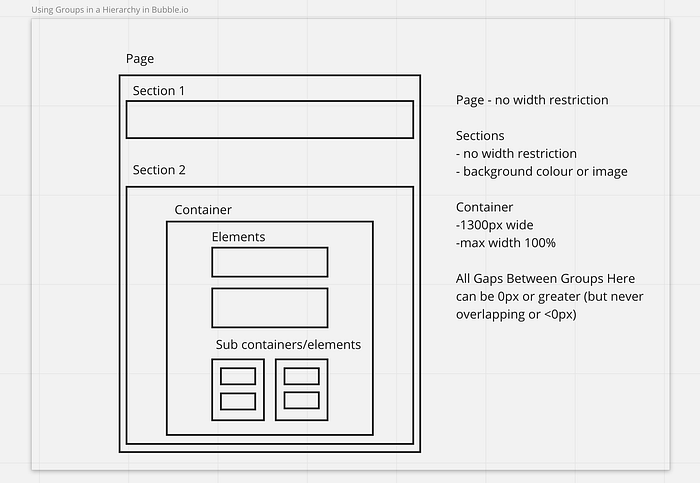
All internal boxes are “Groups” or “Elements” within the Bubble.io Page. In this example, “Sections” are the full width of the page.
Why?
Overlapping elements at the same level in a document can cause problems or unpredictable positioning.
Get Will Ericksson’s stories in your inbox
If you have unpredictable element positioning, look for an accidentally misplaced object.
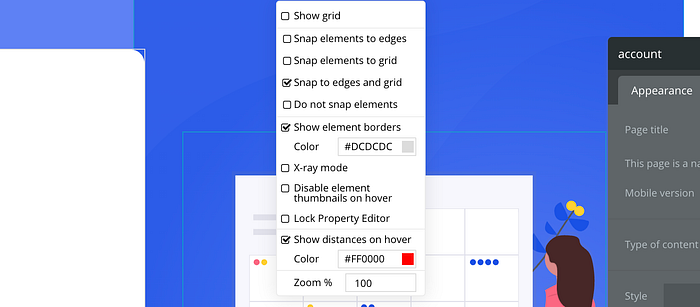
Bubble.io “Show Element Borders” view in the menu.
“Show Element Borders” in the “Grids and Borders” menu can be helpful here.
Centre the elements within the parent element
Try to keep elements in the centre of the parent elements if you want the design to be centred. Bubble.io will maintain the proportions of the spacing on each side as the screen width changes.
Design for responsiveness as you go
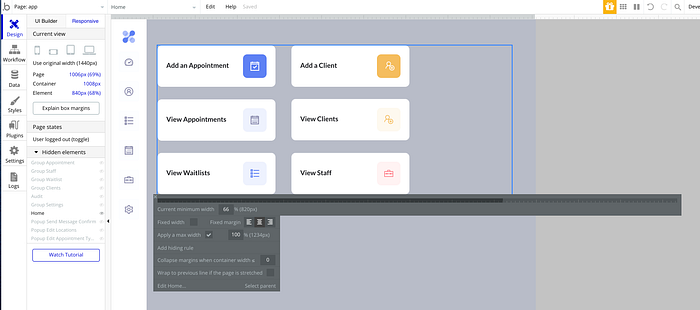
Bubble.io Responsive Editor previewing a page at 1006px wide for client project Get In.
Keep checking how your layouts are responding at each page width. This will inform the grouping of elements and inclusion of margins around elements.
Element Naming Conventions
I try to use Bubble’s default element naming convention:
(Type of Element) (Description)
e.g.
- Group Header
- Input Email
- Button Next
- Group Container
On a page where there are multiple groups with conditional logic to show and hide elements, I might add an extra description at the end:
(Type of Element) (Description) (Context)
e.g.
- Input Password Signup
- Input Password Login
Conclusion
Using a consistent approach allows multiple Bubble developers to maintain projects and function as a professional team.
MomentumGroup.tech is a no-code tech product agency specialising in Bubble.io Development, UXUI Design and Marketing Automation based in Sydney, Australia with team and clients from around the world.
Read our Blog Post on Why We Started Momentum Group.
Will founded Momentum Academy to enable more people to learn and build a career in Bubble with our Intensive Bootcamp Course.
Will is the Director and Lead Developer (Bubble.io) — More about Will here: willericksson.com).
*The views expressed here are those of Will Ericksson and do not represent Bubble. Bubble is a trademark of the Bubble Group Inc.
Where this story went
We spent five years mastering Bubble. Now we build with AI.
Momentum was one of the world's leading Bubble.io agencies — that's why we wrote this article. These days we build and migrate the same kinds of products with Claude Code: real, portable code your own team can amend with AI. If you're weighing up a move off Bubble (or any platform), we've made the journey ourselves.
Related posts
Legacy
**What a Founder’s 1,500-Prompt Failure Taught Me About AI and Vibe Coding**
Recently I had a call with a founder who was looking for advice about building with Bubble.io. He came to me after experimenting with vibecoding , an emerging…
Legacy
In the brave new world of AI coding: Why we’re doubling down on Bubble.io in our agency/venture studio.
Introduction Tool obsession It’s 2025. There’s lots of excitement/hype about generative AI and coding. There’s also a small ocean of opinions about the various…
Legacy
Why Learning Bubble Still Matters in the Age of AI
If you’ve been curious about building apps with Bubble.io, you’ve probably asked yourself at least once: “Isn’t AI going to do all of this for me soon?” It’s a…